who is this for, anyway?
Nav Color
In iOS 7, Apple changed the navigation bar to be semitransparent by default. In doing this, they pull down the saturation of the color you set as the barTintColor. This is a very bad thing. So bad that they fixed it with 7.0.3. That’s great moving forward, but they shipped 3 minor releases with the broken color behavior, and not all users upgrade minor point releases. What’s a developer to do?
UINavigationBar isn’t changing colors if you disable transluency, but in their infinate wisdom Apple didn’t make the transluency property available through UIAppearance, so you’d have to set it manually on every navigation bar in your app. Luckily we have one more trick up our sleave. It looks like the UINavigationBar is not changing image colors if you set an image as the background. But you don’t want to create a new image every time your designer changes their mind, so create a single pixel image in code! Put the following method into a category on UIImage:
+ (UIImage *)imageWithColor:(UIColor *)color
{
    CGRect rect = CGRectMake(0.0f, 0.0f, 1.0f, 1.0f);
    UIGraphicsBeginImageContext(rect.size);
    CGContextRef context = UIGraphicsGetCurrentContext();

    CGContextSetFillColorWithColor(context, [color CGColor]);
    CGContextFillRect(context, rect);

    UIImage *image = UIGraphicsGetImageFromCurrentImageContext();
    UIGraphicsEndImageContext();

    return image;
}
I allow my designers to specify a main theme color with a hex value, and have the following method in a Category on UIColor:
+ (UIColor *)colorFromHexString:(NSString *)hexString alpha:(float)alpha
{
    // Hex strings may optionally start with a #
    NSString *strippedString = [hexString stringByReplacingOccurrencesOfString:@"#" withString:@""];
    NSScanner *scanner = [NSScanner scannerWithString:strippedString];
    unsigned int rgbValue = 0;
    [scanner scanHexInt:&rgbValue];

    return [UIColor colorWithRed:((rgbValue & 0xFF0000) >> 16)/255.0 green:((rgbValue & 0xFF00) >> 8)/255.0 blue:(rgbValue & 0xFF)/255.0 alpha:alpha];
}
Putting in all together, you can now set the background color of your UINavigationBar application wide using UIAppearance! I have an -[AppDelegate initializeAppearance] method I call from application:didFinishLaunchingWithOptions: which contains the following:
- (void)initializeAppearance
{
    // .... snip other app appearance code ...

    // ...snip getting color and alpha values from config
    NSString *hexColor = @"#007646";
    float alpha = 1.0;

    UIColor *barColor = [UIColor colorFromHexString:hexColor alpha:alpha];
    UIImage *backgroundImage = [UIImage imageWithColor:barColor];
    [[UINavigationBar appearance] setBackgroundImage:backgroundImage forBarMetrics:UIBarMetricsDefault];
}
Before:
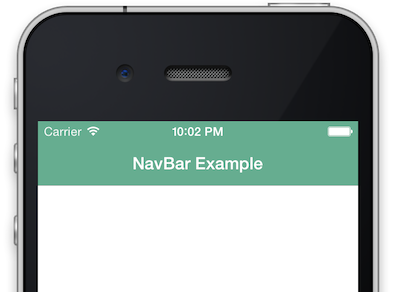
After:
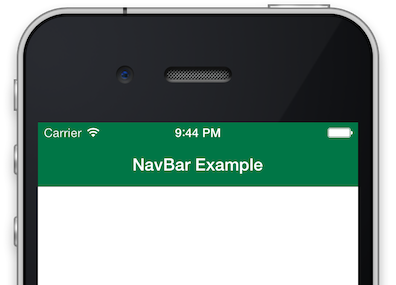
I hope this helps anyone who has to support users on iOS 7.0 - 7.0.2.
Alertview Redux (thank you Apple)
I last took the opportunity to bitch about UIAlertView when a threading error by my predecessor at work caused the screen to flicker. Along with all the problems mentioned in my last rant, it is also often abused by developers stuffing it with custom content, when the documentation clearly states it should be left alone.
Whether it was intentional or accidental collateral damage, iOS 7 breaks most existing UIAlertView customization methods. At WWDC, they announced a new -contentView property to allow these classes to do what they were doing before in a more supported manner. I was less than pleased. I wanted them to disappear, and Apple was promising to make them easier to use.
Lo and behold 3 months later and not only is -contentView not a property of UIAlertView on iOS 7 yet, but it looks like it will not be added at all. This makes me very happy. Not only does it mean other developers have to spent a few more minutes thinking about how this abused content should better fit into their UI, it gives me the political capital necessary to go back and undo some of the sins previously committed in this code base in the name of compatibility. Thank you, anonymous Apple decision maker!
Of course some people will never learn. There are already people in the developer forum that have found new ways to hook into the UIAlertView view hierarchy. I hope they get rejected in the review process and Apple continues to tweak the private class structure. Next step, burn it with fire!
My only concern is that @behrens suggests that people file a radar if they want to see the contentView property added in the future. What if I want it to stay gone? Do I file my own keep it out radar? Will enough people vote the same way with me?
Opaque Review Process
I understand the need to for an app review process. Apple doesn’t want to let broken or misbehaving apps in the store. I understand the time it takes to get to each review. It’s a popular store with thousands of updates a day. I know it takes time to have humans look at each and every one of those. Under those conditions I consider the current 4-5 days very reasonable.
What bothers me about the app store review process is the opaqueness. 5 years in, and there is still no indication of WHERE you are in line, i.e. how much longer you need to wait. When an app finally does go to In Review, there is no indication of what that process is or where your app is in the process.
90% of the time (for me anyway) reviews take less than 5 minutes. In the past I’ve gotten the Processing for App Store email before the In Review email, it goes so fast. But that other 10%, oh the 10%. That last 10% of the time reviews can take days. Why? Is there a policy question they’re checking with their supervisor about? Is the reviewer having problems logging in? Did they claim a whole bunch of apps for review off the presumably common review stack and then go home for the weekend? No idea. There is never contact from the reviewer. It’s just In Review. If it is a policy question, then why haven’t they ever contacted my to say “Hey, this is questionable”. I’d gladly change/remove whatever it is they have a problem with.
BTW: The web server logs show that no one has ever logged into the test account we provide for the reviewer(s) in the year I’ve been checking. Not once. How in depth can your review of the app get if you never get past the login screen? My last 3 day In Review time was on a 2-line x.x.1 release to fix a display bug the reviewer never looked at.
Promising Features to others
Had another great idea come across my desk today that I would love to put into production and push out right away. Newbie Emily would have promised that feature in the next release, scheduled X.Y.Z day, possibly with a smiley face on the end of the mail.
Old grizzled Emily knows better. Old Emily has had too many features postponed or killed by schedules, or management, or politics, or bugs to promise anything to anyone. Here are my 4 basic responses to great ideas now:
-
That is a nice idea.
That is it for ideas I have not actually written any code for. No estimates, no, “I want to do that”, no “I’ll try to make that happen”. Give any more than this and someone will end up disappointed when it does not happen.
-
Let me think about that.
You will this response if I have actually written the majority or what you are asking for, and have cleared it politically with QA, management, whomever feels they are entitled to make decisions about what I build.
-
That should be in the next major release.
You only get this far if I have already landed your feature in trunk/master (depending on your VCS), and our release process is such that we do not have a release branch cherry-picking features from master. Note the complete lack of a time frame on when that release might happen, and the two emphasized weasel words left in statement even at this late stage in the process. Should is there because features can always be removed due to political or technical integration reasons, and major because I need to leave an escape hatch to have a release without the feature (think small emergency bug fixes).
-
Your feature has been available since version X.Y.Z release DD MMM YY
That is right, the only way you get a specific time frame from grizzled old Emily is if your feature is already shipping, and preferably has had a few days to settle in and get tested by people who were not necessarily waiting for it, that way if they find bugs I have time to fix them before the person looking forward to said feature (you) get to use it.
It seems a little harsh, but I have been bitten too many times by schedules and politics to promise anything more.
Motivation for the mundane
So where do you find the motivation to work on the boring stuff? I don’t mean documentation, unit tests, localization, etc. That stuff is fine, if it’s for a product you believe in. I mean having become more of a Product Person, how do you keep working on the projects that clearly are not the thing people will use because they want to, but because they have to?
I am responsible for 2 large products at work. App A is a consumer facing application available for public consumption in the app store. End users choose to download and run it not because they have to, but because it solves a problem for them better than loading a webpage on a PC, or using their bank’s Bill Pay solution. It has a never ending stream of feature requests and I’ve got my own giant backlog of technical improvements to bring it up to date. It is a Product with a capital P.
App B is a B2B enterprise behemoth. It is the kind of thing companies build to use internally, and occationally turn around and sell to others to defray the cost. No one will ever use this thing because they want to. It has a dozen programmers from a half dozen departments working on it because it needs to be everything to everyone. It is the very definition of dull business app. The only feedback it will ever receive is “It doesn’t work like giant system B’, therefore it sucks”.
My problem here is that management has ordered me to work on B full time to help get a prototype out the door, and I cannot force myself to work on it. Even though the objective part of my brain knows I need to work on it to fulfill certain contractual and political obligations, my impulsive side jumps at every single opportunity to work on App A, wether its “emergency” bugs, feature design, or even end user support. Toss in the mental preload time it takes for me to write good code, and I am way, way behind schedule. Even though App B should be all the fun part of software engineering, writing code, I just can’t do it.
So how do I get it done? I don’t know yet, but I’ve got probably got less than a week to figure it out or face some serious consequences.
Update from the future This was & executive dysfunction, because I’ve got undiagnosed/unmedicated adhd.
Becoming a product person
Since I have transitioned from the realtime simulation world into mobile app development, I find myself becoming a product person. I suddenly have opinions about how software should look and how the UX should behave. I want to build things people choose to use because it is fulfills some need or want in their life not, because they have to use it to get their job done.
Iwsoy Os
Is WWDC Sold Out Yet? is Open Source!
Get the source here. It's wrtten
completely in JavaScript using Node.js and hosted on
Heroku. A short walkthrough is coming soon (Update: here ). It was an
experiment to learn how Nodejs and these new alternative hosting solutions work.
I had a lot of fun trying something new and I think it helped me appriciate
closures a lot more. If you want to contribute, or find any glaring errors
please let me know or open a pull request and I'll get it fixed asap.
Note: While it was developed from scratch in git, this is a fresh repository with zero history of how it got here, since some of the intermediate stages had credentials for various external services hardcoded.
Nodedub
A brief(?) introduction to the source for Is WWDC Sold Out Yet?
As I said in the release announcement, the site was a way for me to get some experience with a new toolset, so don't expect to see a lot of best practices or even correct practices when looking through the code. I had used nodejs on the job briefly before, but it was someone else's existing design, and I believe you don't really know a language/framework until you have built something in it from scratch yourself.
This is also not a How to get started with Heroku or How to get started with Node.js article. There are plenty of those on the web. I used several building it. This is just me trying to hit the highlights of what makes this site unique.
Before I start, I would like to thank @esigler for jumping on the domain registration and setting up a github repo and heroku instance as soon as we started joking about it on twitter. I definately would not have actually written this if he hadn't taken it seriously and created them right away.
dubstate.js
The app has 1 main piece of state. What is the current status of WWDC?
var DUBSTATES = {
description = {name
description = {name
description = {name
};
apple.js
This file provides the meat of the application. Is WWDC actually sold out yet? It gets https://developer.apple.com/wwdc/, counts the number of instances of 2012 and 2013, and if 2013 is mentioned more, it assumes WWDC 2013 has been announced and triggers the state change from NO to MAYBE. This function is called every 5 minutes via a simple setTimeout() call.
var checkYear = function () {
  https.get('https://developer.apple.com/wwdc/', function(res) {
    var wwdcContent = "";
    res.setEncoding('utf8');
    res.on('data', function (d) {
      wwdcContent = wwdcContent.concat(d);
    });
    res.on('end', function() {
      var oldyear = wwdcContent.match(/2012/g);
      var newyear = wwdcContent.match(/2013/g);
      ...snip error checking...

      if ((dubstate.currentState == dubstate.DUBSTATES.NO) && (newyear > oldyear)) {
        dubstate.trigger("MAYBE");
      }
    });
  });
};
That trigger action at the end checks the database to see if it has already happened (restart, multiple nodes, etc) and if it hasn't, then it sends and email to everyone who has registered their email address.
Handling email
This part was tricky. Registrations trickle in slowly, but when the site changes, everyone expects to receive an email immediately. So to ensure we get as many emails out as we can and still keep it cheap/free to run, we:
- Confirm email addresses. Nothing too hard, just a simple encryption of the email address & a nonce bundled in a url for the user to click to make sure the recipient really wanted to be added. We send this confirmation through gmail since they happen slowly.
- Cull uncomfirmed addresses regularly. Lots of people will test with fake addresses for some reason, or bail when they find out it is a two step process. This keeps the record count low, and keeps us in the free rowcount for heroku.
- Once confirmed, add users to a mailgun mailing list. This allows us to send a single email when Apple's site is updated and ensures everyone gets it in a reasonable timeframe.
building the confirmation url
var confirmationString = email + ":" + nonce;
var cipher = crypto.createCipher('aes-256-cbc', credentials.aesKey);
var crypted = cipher.update(confirmationString, 'utf8', 'hex');
crypted += cipher.final('hex');
var url = "http://" + req.headers.host + "/confirm?confirmationString=" + crypted;
emailer.sendConfirmationEmail(email, url);
credentials.js
At one point in development I had most third party credentials (gmail, mailgun) hardcoded in the source, which is why the github repo has no history. It has since been changed to read these values from environment variables. Heroku and other cloud hosting services allow you to set these env vars easily based on environment (dev/test/production), and reading them in with javascript is extremely straightforward.
/* for encoding/decoding confirmation string */
exports.aesKey = process.env.CONFIRM_AES_KEY || "";
if (exports.aesKey == "") {
  console.log("Error: Missing AES key.  Won't be able to process confirmation emails.");
}
route/index
By default, the express framework uses the jade templating engine to reduce the amount of HTML you have to write. It takes a little getting used to, and I'll admit I barely learned enough to get a functional page displayed. This is one of many problems I have with ruby as well, I don't want or need a shorter HTML, I just want some defined way of inserting templated variables like with underscore.js or jquery.
the index javascript where variables are passed
exports.index = function(req, res) {
title = "Nodedub"
                        value: dubstate.currentState.name,
description = dubstate.currentState.description });
};
the jade index template file
extends layout

block content
  h1= value
  p= description

  if value == 'NOPE'
    p Register your email below to be notified when WWDC is announced.
    form(name="registration", action="/add", method="get")
      input(type="text", name="email", size="35", maxlength="320")
      br
      input(type="submit", value="Submit")

  if value == 'ALMOST'
    a(href="https://developer.apple.com/wwdc") WWDC at Apple

  br
  br
  a(href="/privacy") privacy policy
fin
That's it as far as the unique bits I think. There are some helper functions I wrote for accessing the database and emailing, but they are pretty self explanatory, and the app.js (int main() if you will) is mostly boilerplate stuff to get the server running and set up the routes/pages. If you want further clarification hit me up on email/twitter and I'll be glad to expand this post.
End of iOS3
All the tech nerd/mac nerd sites keep pointing to the UDID ban as the big news of the day. While that is indeed important, and every developer should make sure none of their code or 3rd party dependencies like crash reporters or ad networks use the UDID anymore, I think the most overlooked item of the day is Apple's second post.
As of May 1, iPhone 5 support is required. While this may be great news for those iPhone 5 users who are tired of apps not using those extra 88 points of vertical realestate, it is the final nail in the coffin for those still using iOS < 4.3 and iPhone 3G or iPod touch 1G/2G devices.
While most app developers had already set the minimum version supported of their products to 4, 5, or even 6, it was still techinically possible to support all the way back to 3.2 by using Xcode 4.4. That's because Xcode 4.4 still allowed you to target iOS 3.2 and create armv6 binaries. With Xcode 4.5, apple stripped armv6 support and set the minimum iOS target at 4.3. Apple has also decreed that if you want to support the iPhone 5, you must build with the iOS 6 SDK and at least Xcode 4.5, even though it still technically works with the iOS 5 SDK on Xcode 4.4 (Apple ties SDK versions to Xcode releases).
Yes, I know if you google hard enough there are ways to partially build in Xcode 4.5, take those results and re-build and archive them on Xcode 4.4 and submit THAT franken-binary, but that's way outside supported territory getting into submission rejection land for doing funky things. Bye Bye iOS 3 and iPhone 3G owners. It was nice knowing you, but at least now everyone can transition to ARC without feeling like it was their decision to cut off older customers.
iOS 6.1 screen flickering / UIAlertView
With the release of iOS 6.1, my main product at work started flickering pretty badly. Sometimes the whole screen, and sometimes just small regions unrelated to view boundaries. I initially had no idea what was going on, but woke up at 4am the next morning with one thought keeping me awake. UIKit.
A few hours of hunting later and I found it. An UIAlertView was being created and shown from a background thread early in the app setup process, and once you triggered it the flickering continued sporadically until the app was killed with the task switcher. Once you got past this initial setup phase most users never trigger this particular alert view again, so it only affects new users (those most likely to leave App Store reviews). This bugged version is still available in the App Store at the time of this writing because of a software release process that I will rant about another day.
I knew it was almost certainly an alert view triggering this bug, so why hours? Because we have 150+ alert views in this app, and I had to try triggering nearly each and every one of the until I found the right one.
I hate the UIAlertView. How much do I hate it? Let me count the ways.
-
It’s an ugly hack for lazy programmers to stop the user from interacting with your app on a device that should always be under the users control, 100% of the time. And it can’t even do that. The device has a giant home button that always interrupts program execution and returns the device to the home screen. At any time. Good luck recovering your uninterruptible state upon relaunch when that happens.
-
It’s too easy to create. You don’t have to stop and think about where it belongs in you’re view hierarchy. You can create and show one anywhere with 2 lines of code and user interaction grinds to a halt. This is where my particular bug came in. My predecessor didn’t stop to think where he was calling it from.
-
It’s design is crap. Assuming you have a need for such a concept (you don’t), then at least make sure it doesn’t cause a mountain of spaghetti code when used. This class has a single app delegate who’s main method upon return only gives you a button index. It is your responsibility to keep track of what the buttons prompted the user to do, and if you have multiple alerts which one was shown and what the appropriate action to take upon their dismissal should be. This leads to long switch statements dispatching other functions at best, and a giant didDismiss…. function at worst. Let’s face it, you’re always crunched for time and doing the awful hack way.
-
There is no notification when you screw up. This is more of a UIKit hate in general, but if your going to require all UI state changes happen on the main thread, then by God have some way of enforcing it other than bugging out at runtime. Do some static analysis and throw a compiler warning. Abort() at runtime. Something other than random glitching on users please.
-
It’s a modal popup. I hate popups. You hate popups. Users hate popups. The only thing worse than a popup is a popup that forces you to interact with it.
It may have been necessary durning the 2.0 days when everything was single threaded, but now UIAlertView is a rotting crutch used by the stupid and the lazy. We’ve got blocks and GCD for doing data crunching in the background while keeping the UI responsive. We’ve got simple synchronization methods for updating the UI when the work is done. Just think about user experience for two seconds before using it. Please. That’s all I ask.
+++ tl/dr; Don’t touch UIKit from background threads. UIAlertView blows.